GPT-6 Astra:capabilities, API pricing, and practical use cases
A practical look at GPT-6 Astra: what OpenAI has announced, what developers can configure, and what to verify before putting a new model into production.

The starfield artwork from OpenAI’s GPT-6 Astra announcement.
What is GPT-6 Astra?
GPT-6 Astra is OpenAI’s new model for complex, multi-step work. The announcement emphasizes coding, computer use, research, and professional tasks. Its focus is not only answering a question, but carrying work through tools and applications to a finished result.
For teams evaluating a new model, the useful question is where it removes a real bottleneck. A faster first draft matters less if reviewers still spend an hour correcting it. This guide separates published model facts from practical evaluation advice so you can design a pilot around your own acceptance criteria.
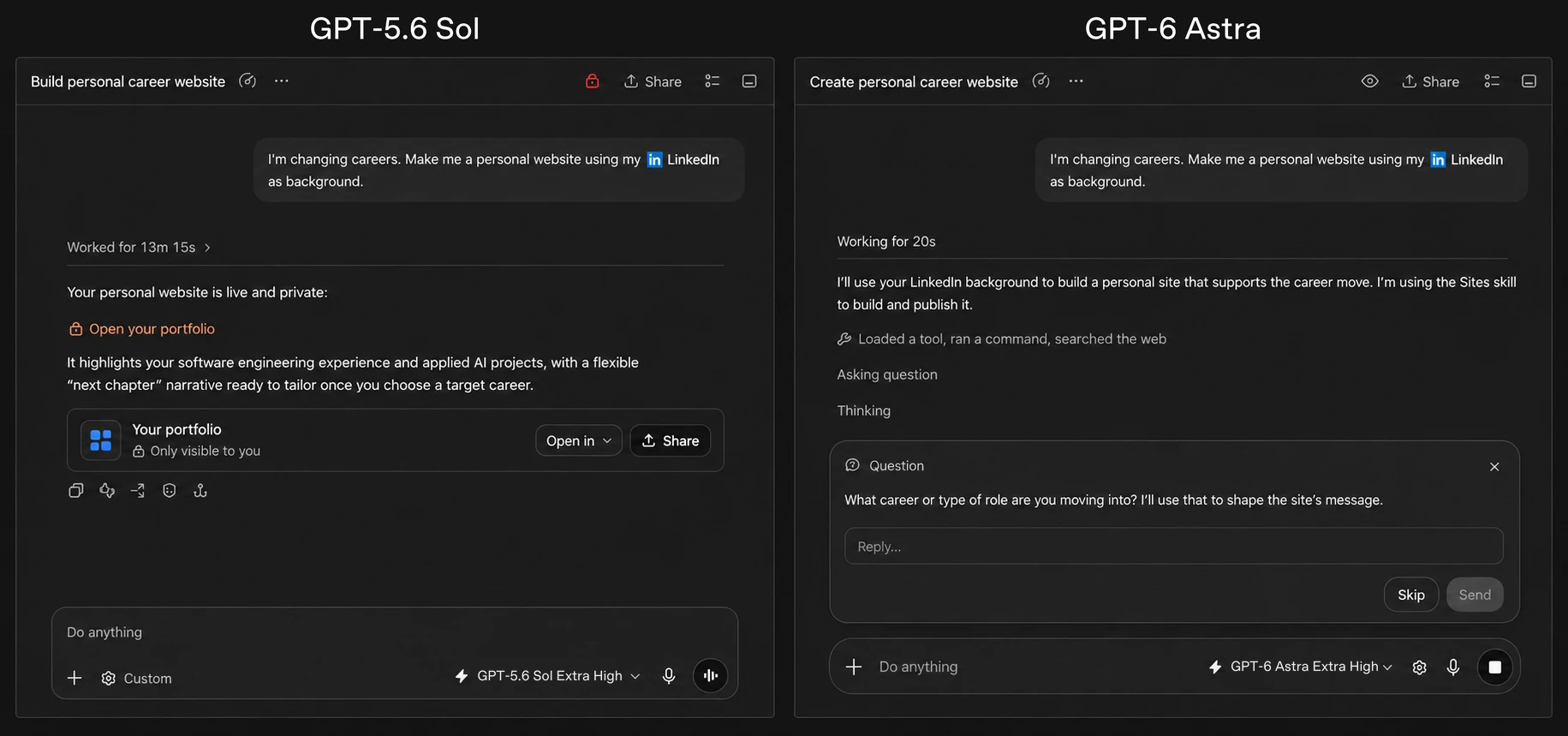
OpenAI’s career-website example illustrates Astra asking a clarifying question about the user’s intended career change.
Source: OpenAI GPT-6 Astra announcement.
From software engineering to computer use
OpenAI describes improvements in browser and desktop workflows, codebase work, and producing documents, spreadsheets, and presentations. It also reports stronger scientific reasoning and safer task-boundary behavior. These are provider-reported capabilities, not results independently measured by LAYSO.
A useful coding pilot starts with a small, reproducible issue: supply the repository, define the expected behavior, and require tests. For a research pilot, provide a bounded source set and ask for a report that distinguishes observations from assumptions. For document work, supply the actual template and verify the exported file, not just the model’s description of it.

Solace Garden House: exterior and interior views from the architectural visualization example published by OpenAI.
Source: OpenAI GPT-6 Astra announcement.
GPT-6 Astra vs GPT-5.6: reading the benchmarks
OpenAI reports higher Astra scores than GPT-5.6 Sol on the three evaluations below. Scores depend on the test version, tools, and evaluation setup. They are evidence about particular tasks, not a promise that every production workflow will improve by the same amount.
Build a comparison set from requests your team actually handles. Keep inputs and tool permissions consistent, record retries and human corrections, and score finished outputs against the same rubric. Choose the model that meets your quality target at an acceptable total cost.
| Evaluation | GPT-6 Astra | GPT-5.6 Sol |
|---|---|---|
| OSWorld 2.0 (offline, partial score) | 72.6% | 65.7% |
| Terminal-Bench 4.0 | 57.9% | 37.3% |
| FrontierMath Tier 4 (v2) | 97.6% | 83.0% |
GPT-6 Astra benchmark image library
Explore 14 charts from the reference announcement, grouped by task. Open any image at full resolution or download the original PNG. The figures describe source evaluations, not LAYSO measurements. API costs on these charts are not LAYSO prices, and results are specific to the evaluation setup.
Reasoning, mathematics & coding(4)
ARC-AGI-3
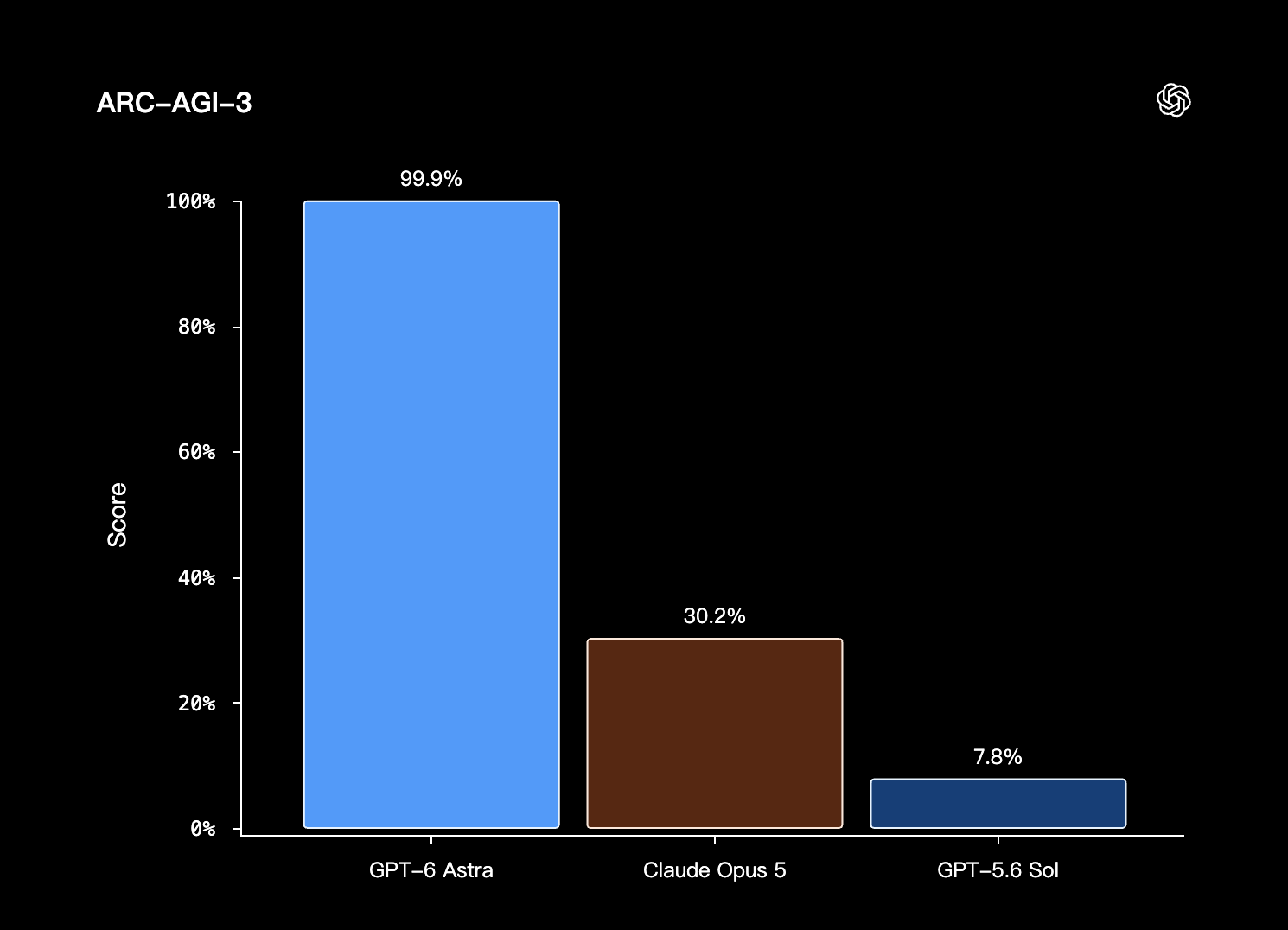
The supplied chart reports scores of 99.9% for GPT-6 Astra, 30.2% for Claude Opus 5, and 7.8% for GPT-5.6 Sol.
FrontierMath Tier 4 (v2)
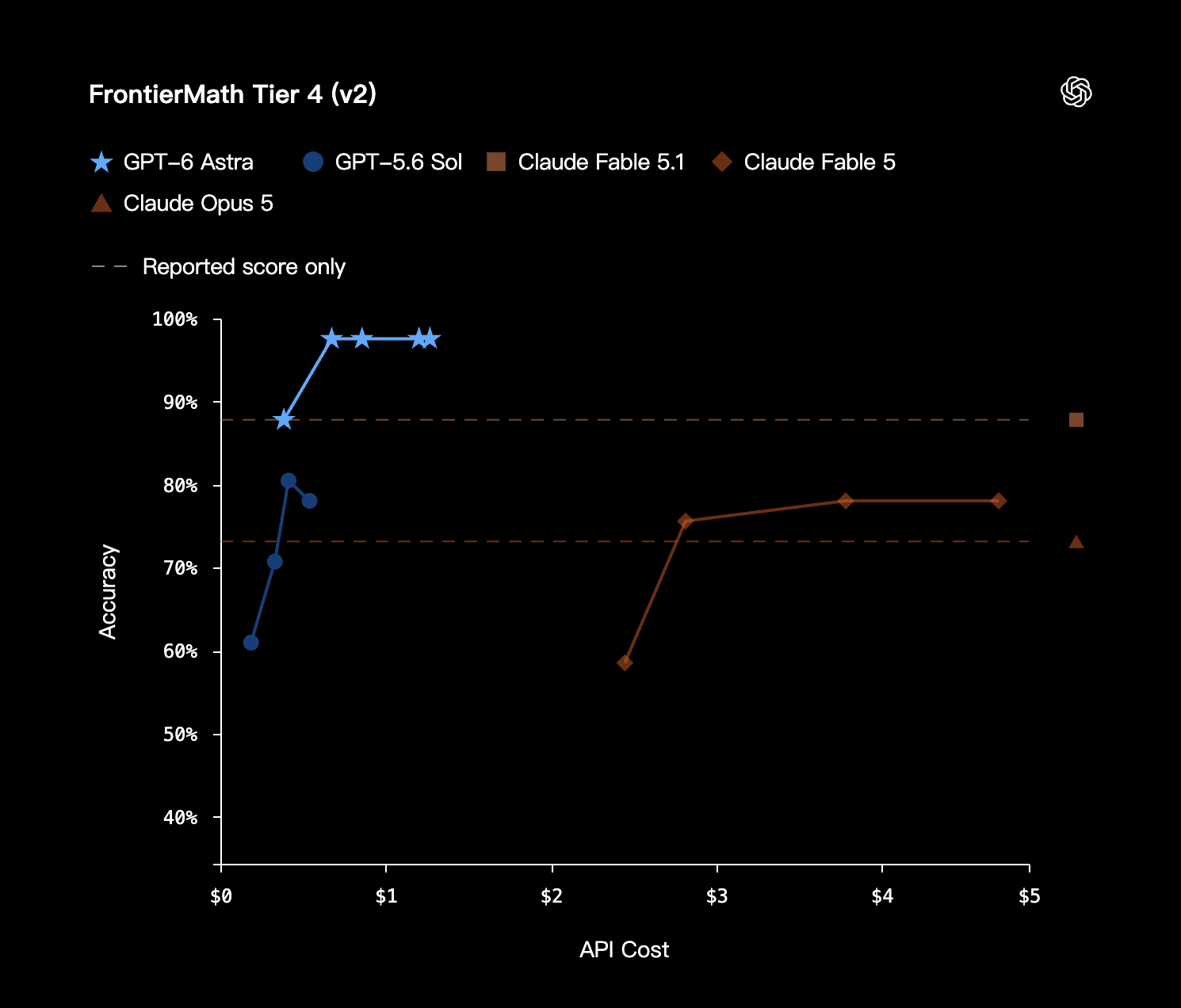
Advanced mathematics accuracy against API cost, with reported-score-only references shown as dashed lines.
Terminal-Bench 4.0
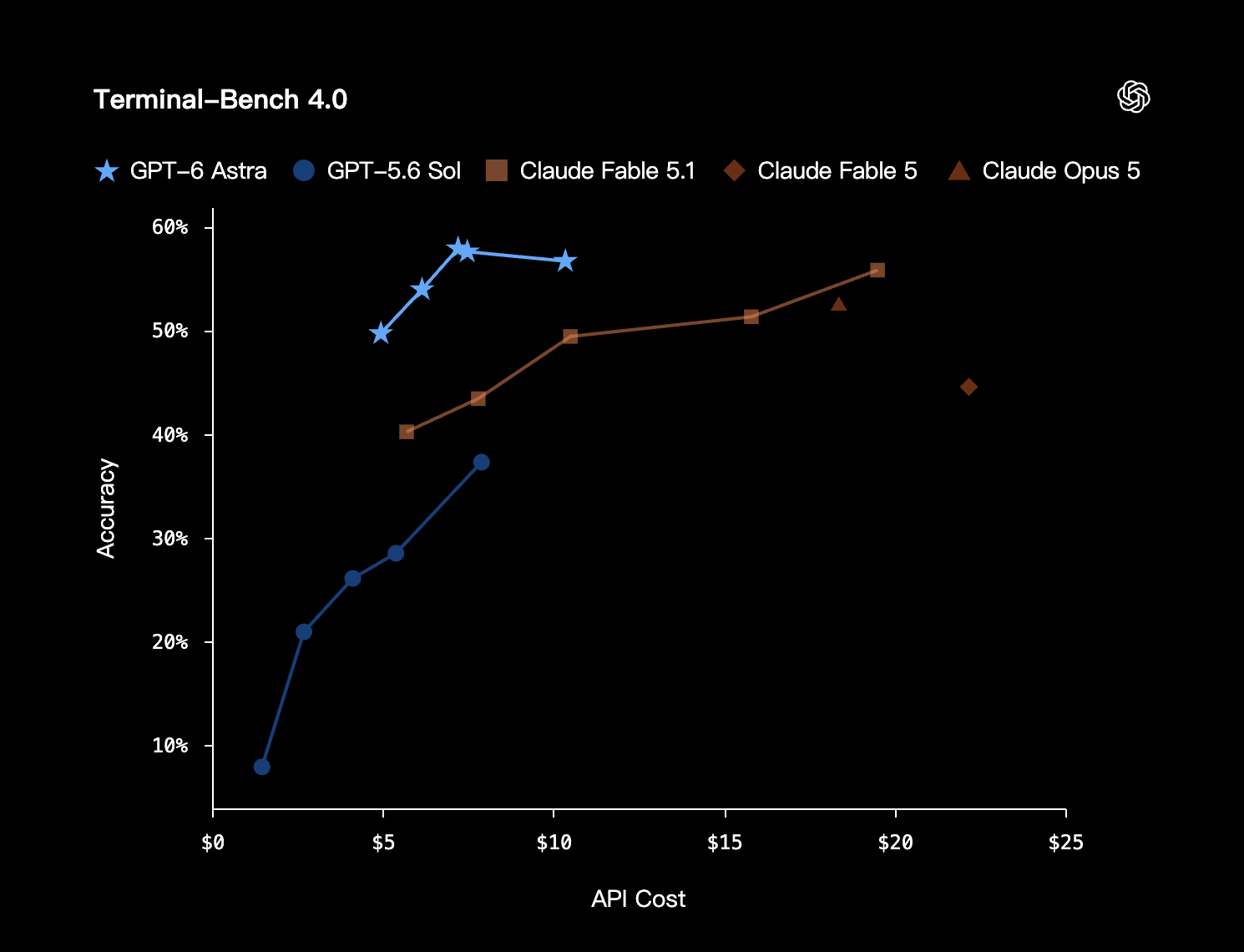
Terminal-task accuracy across API cost levels for the models included in the source chart.
Terminal-Bench Science 0.1
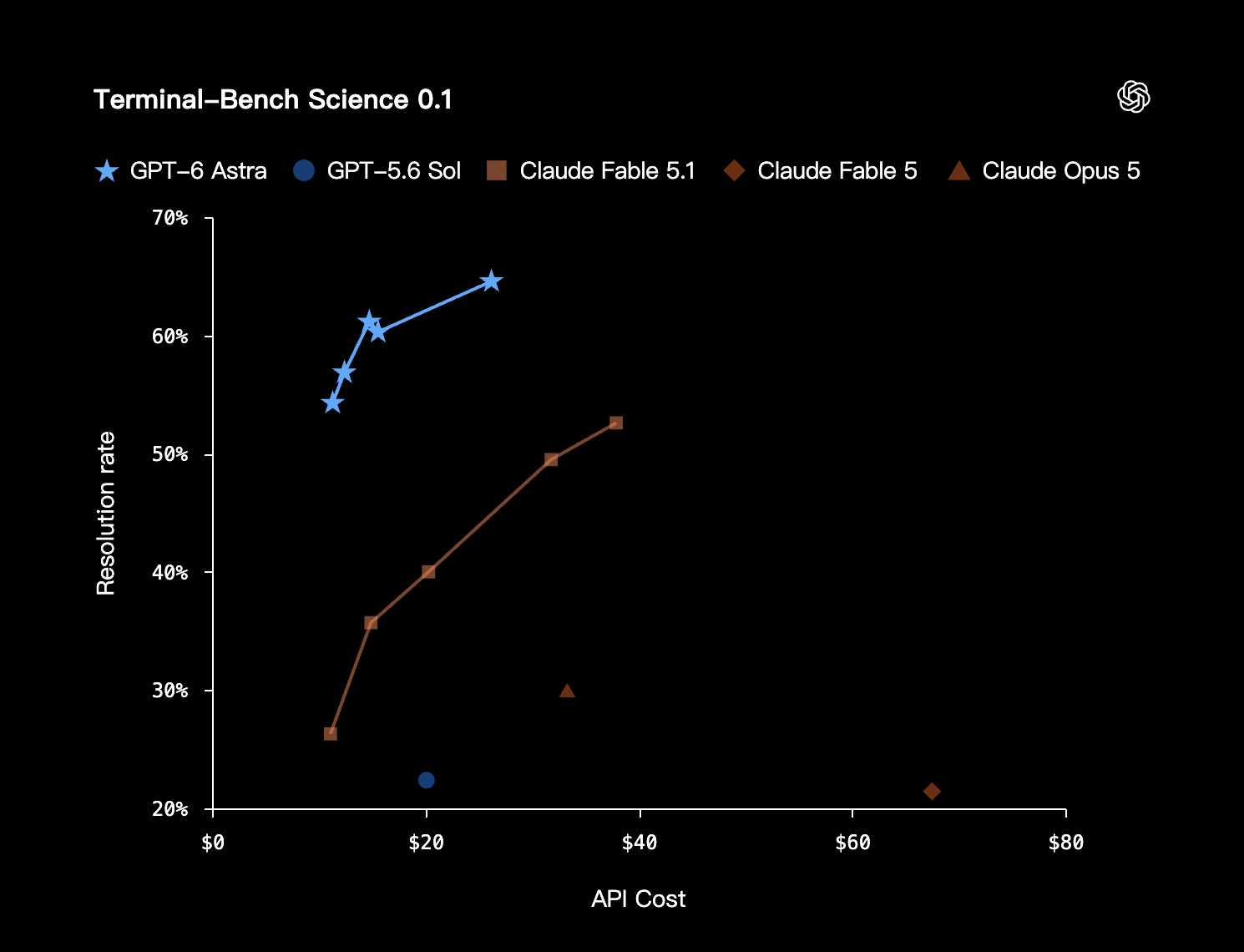
Scientific terminal-task resolution rate plotted against API cost.
Computer use & browsing(4)
Agents’ Last Exam
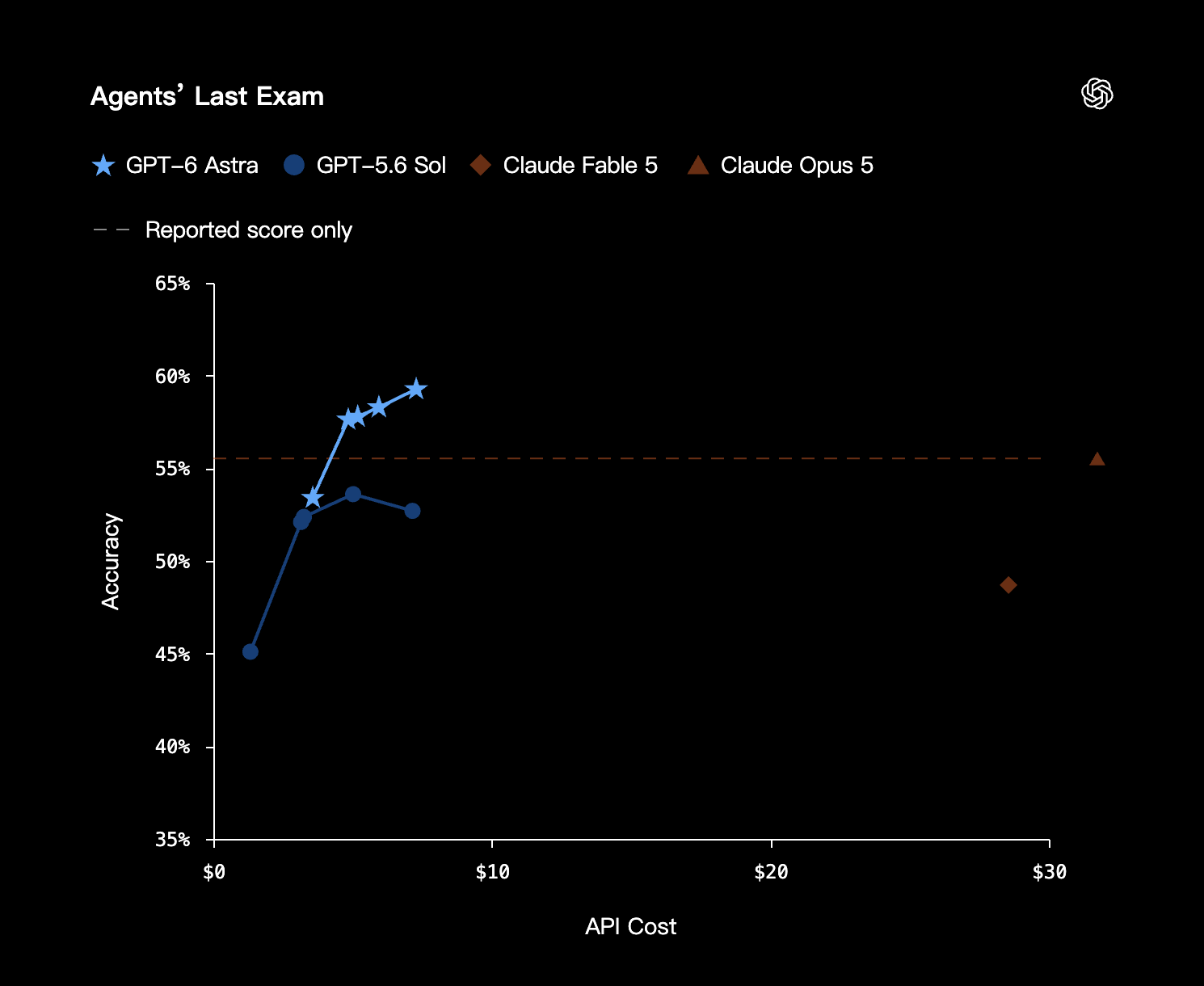
Accuracy against API cost for GPT-6 Astra, GPT-5.6 Sol, and the Claude models shown in the source chart.
BrowseComp
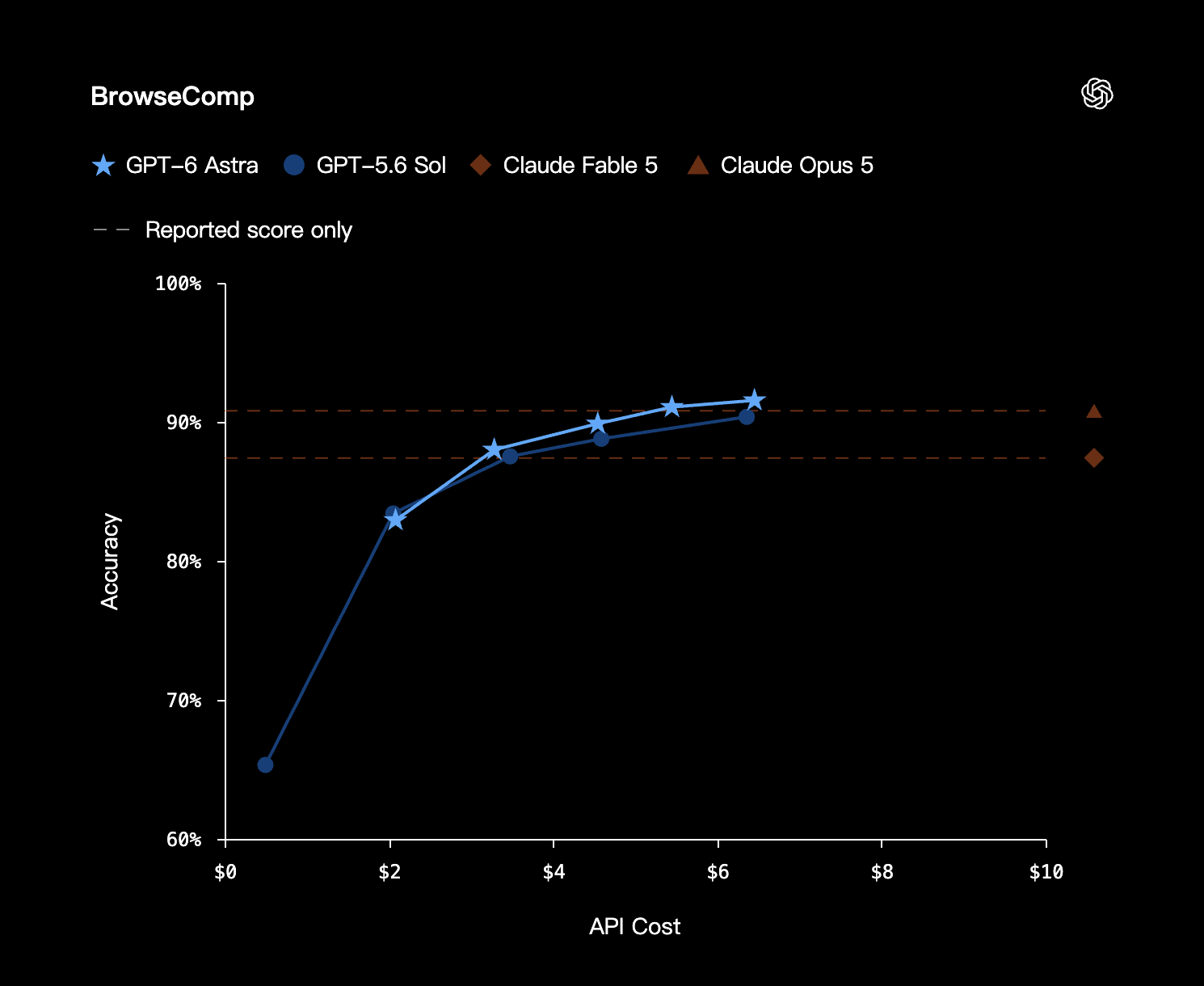
Browsing evaluation accuracy versus API cost; dashed lines mark reported-score-only comparisons.
OSWorld 2.0 · Offline
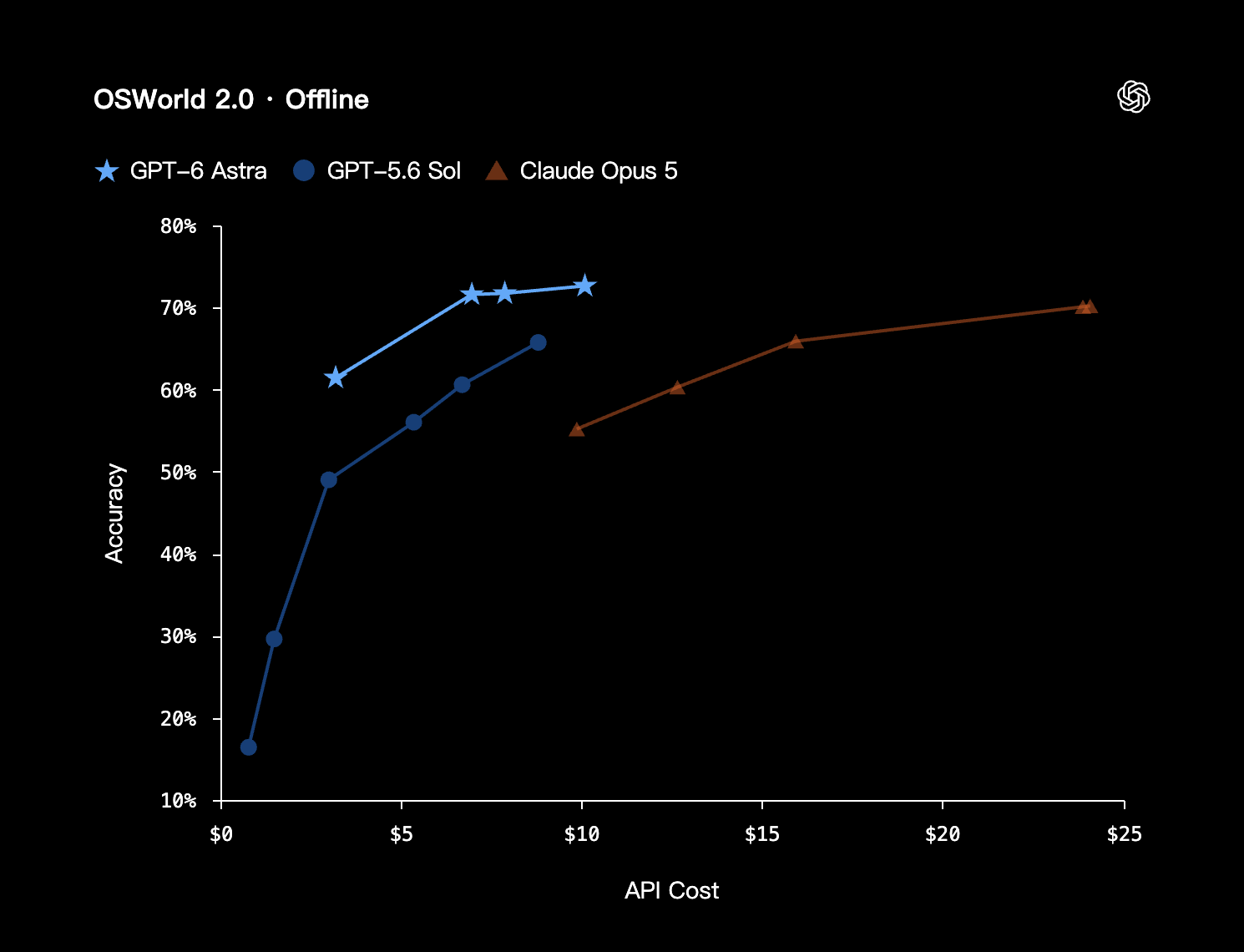
Offline computer-use accuracy plotted against API cost for GPT-6 Astra, GPT-5.6 Sol, and Claude Opus 5.
ScreenSpot-Pro
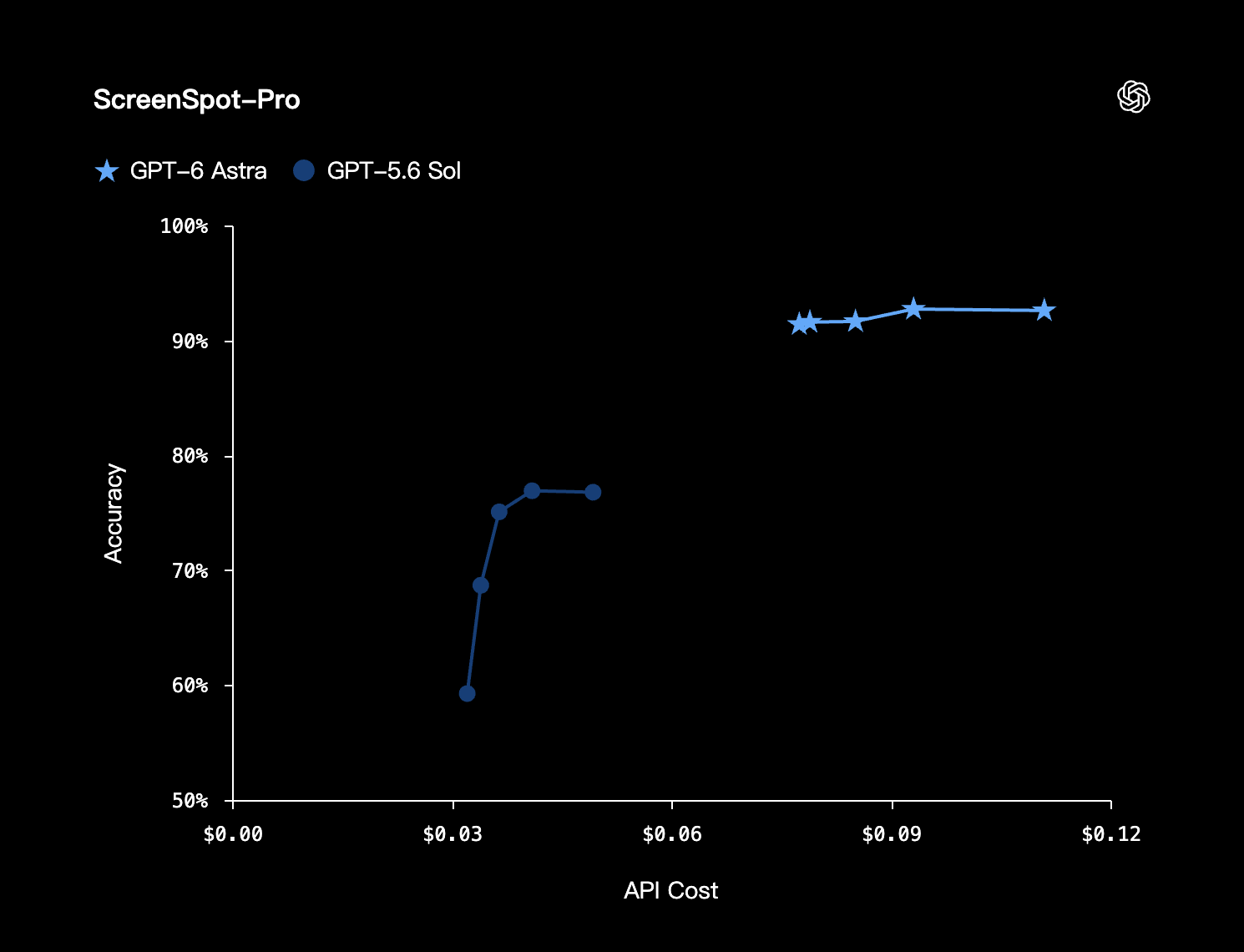
Screen-localization accuracy versus API cost for GPT-6 Astra and GPT-5.6 Sol.
Professional & creative work(5)
AutomationBench
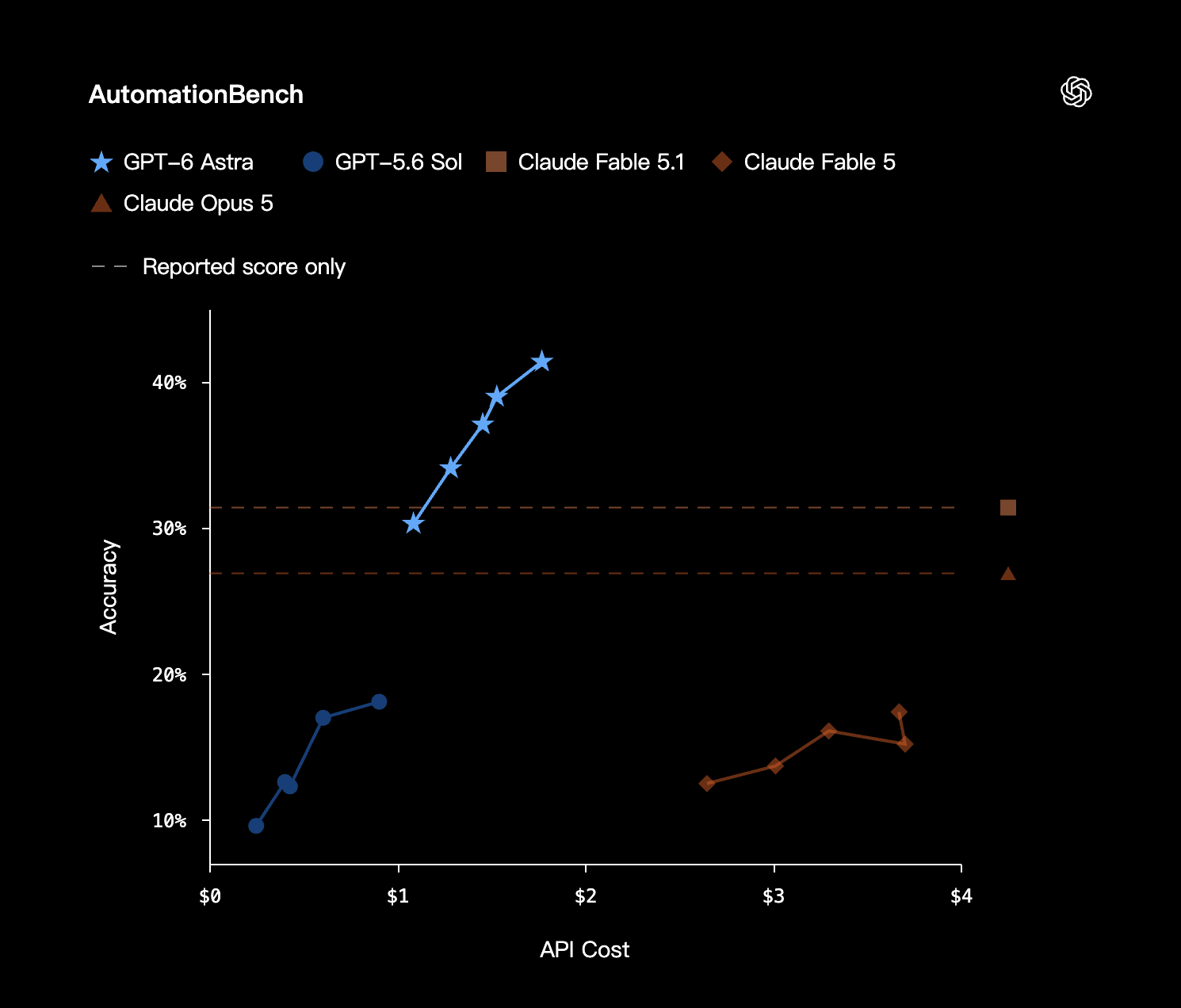
Automation accuracy at different API costs. Dashed lines indicate reported scores without a corresponding cost curve.
BenchCAD (Python tool)
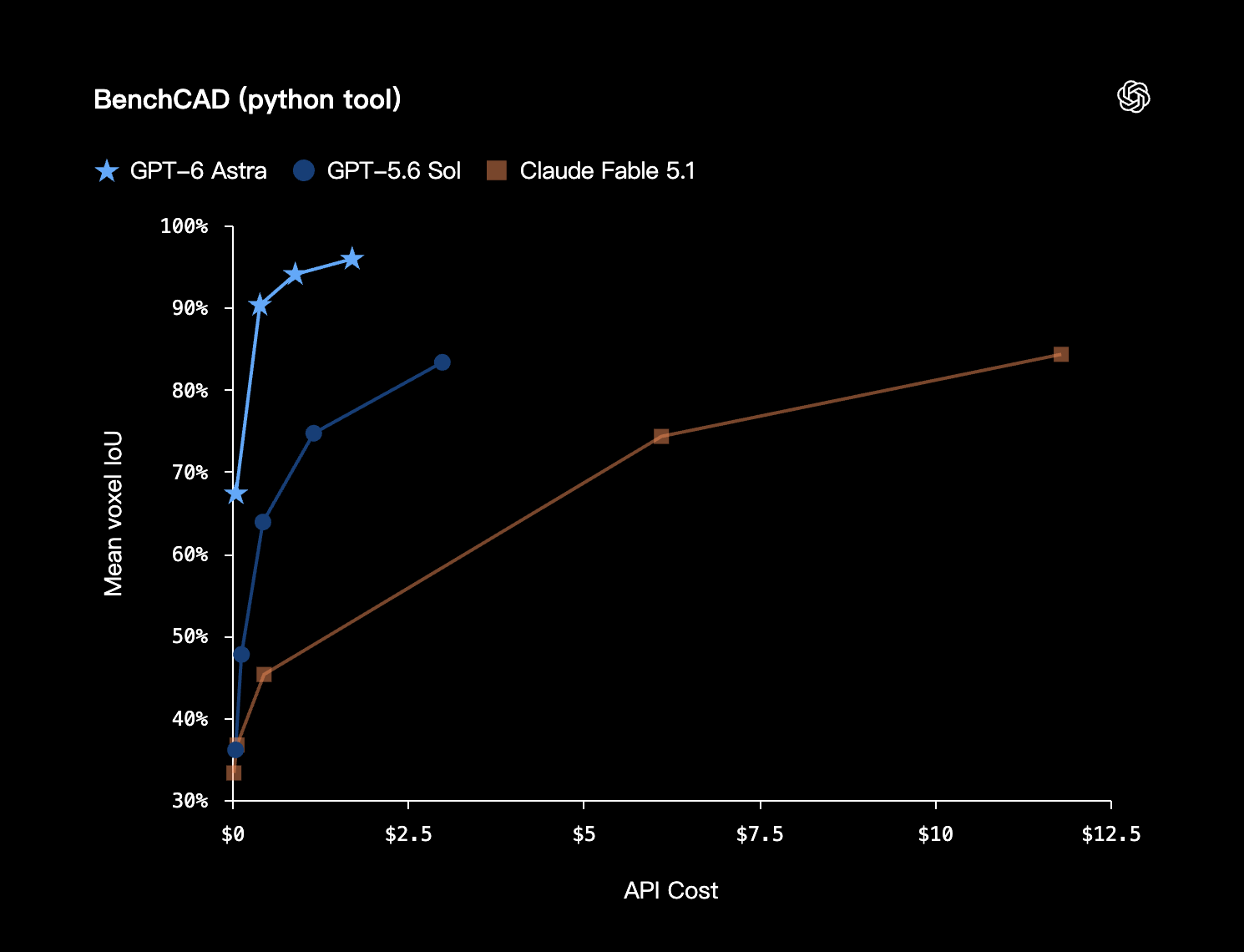
Mean voxel intersection over union versus API cost in the Python-tool evaluation.
Data Science Tasks (Internal)
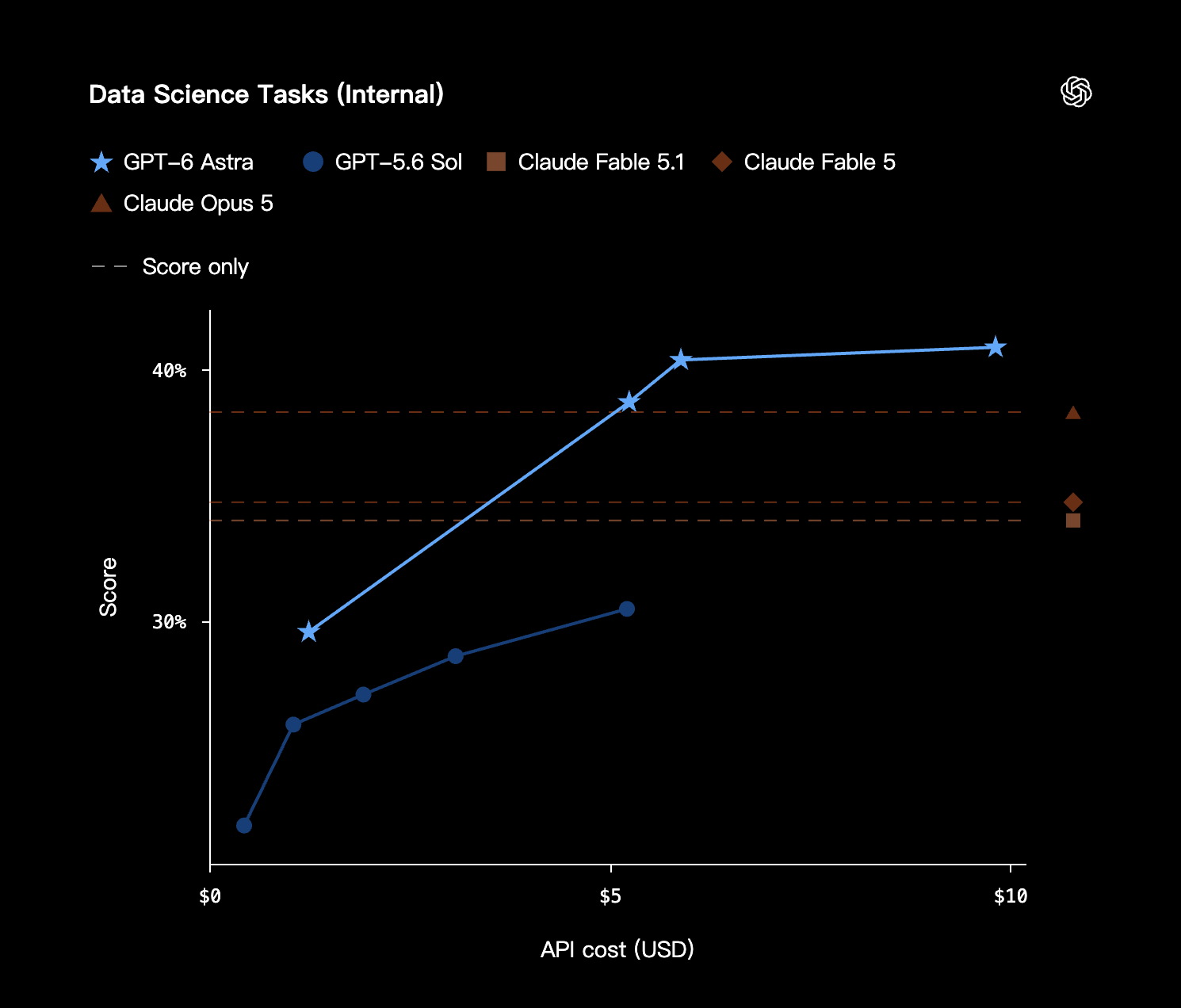
Scores across API spending levels on the internal data-science task evaluation.
Design Tasks (Internal)
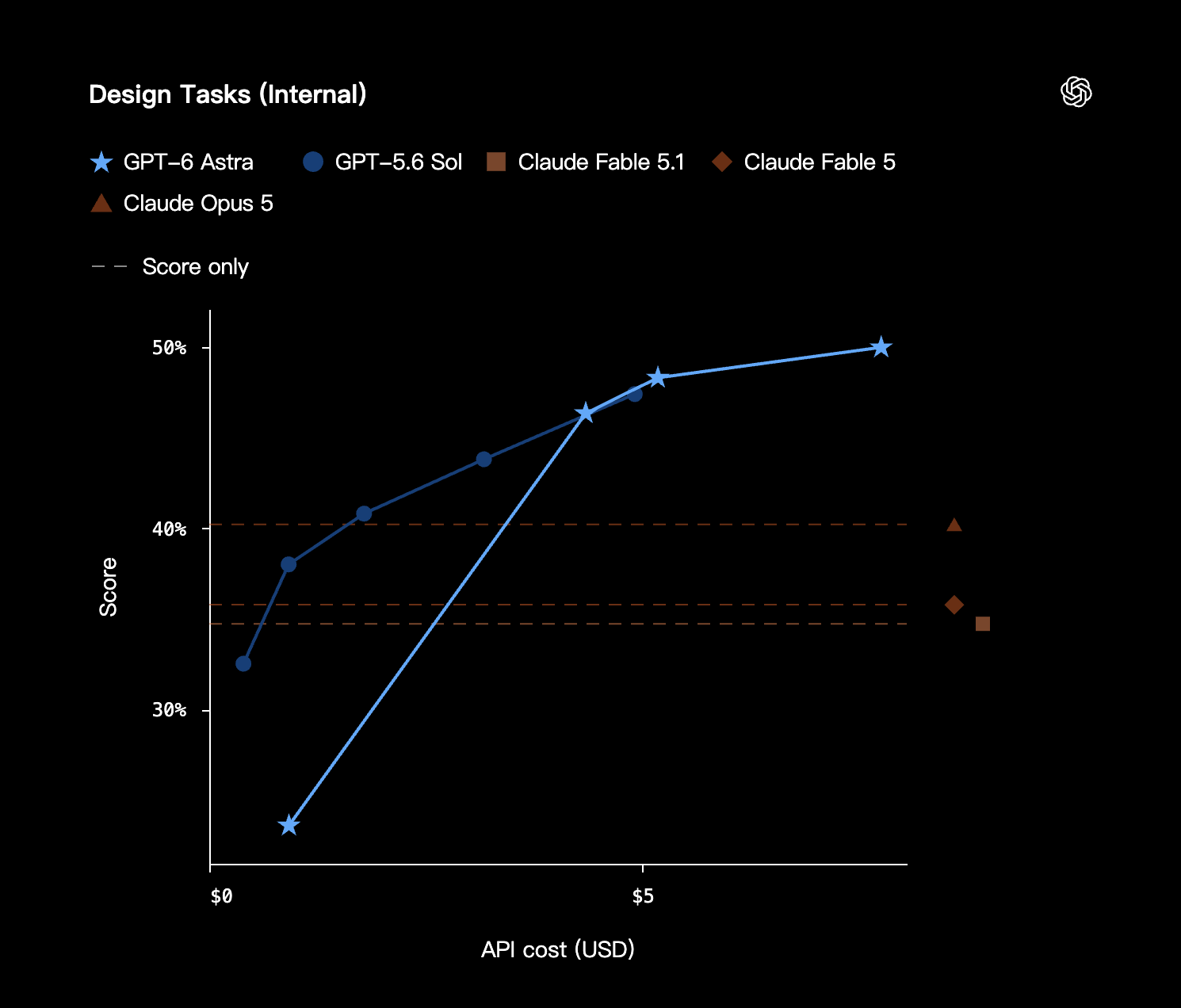
Internal design-task scores across different API budgets. The relative results depend on the budget shown.
OpenScore String Quartets
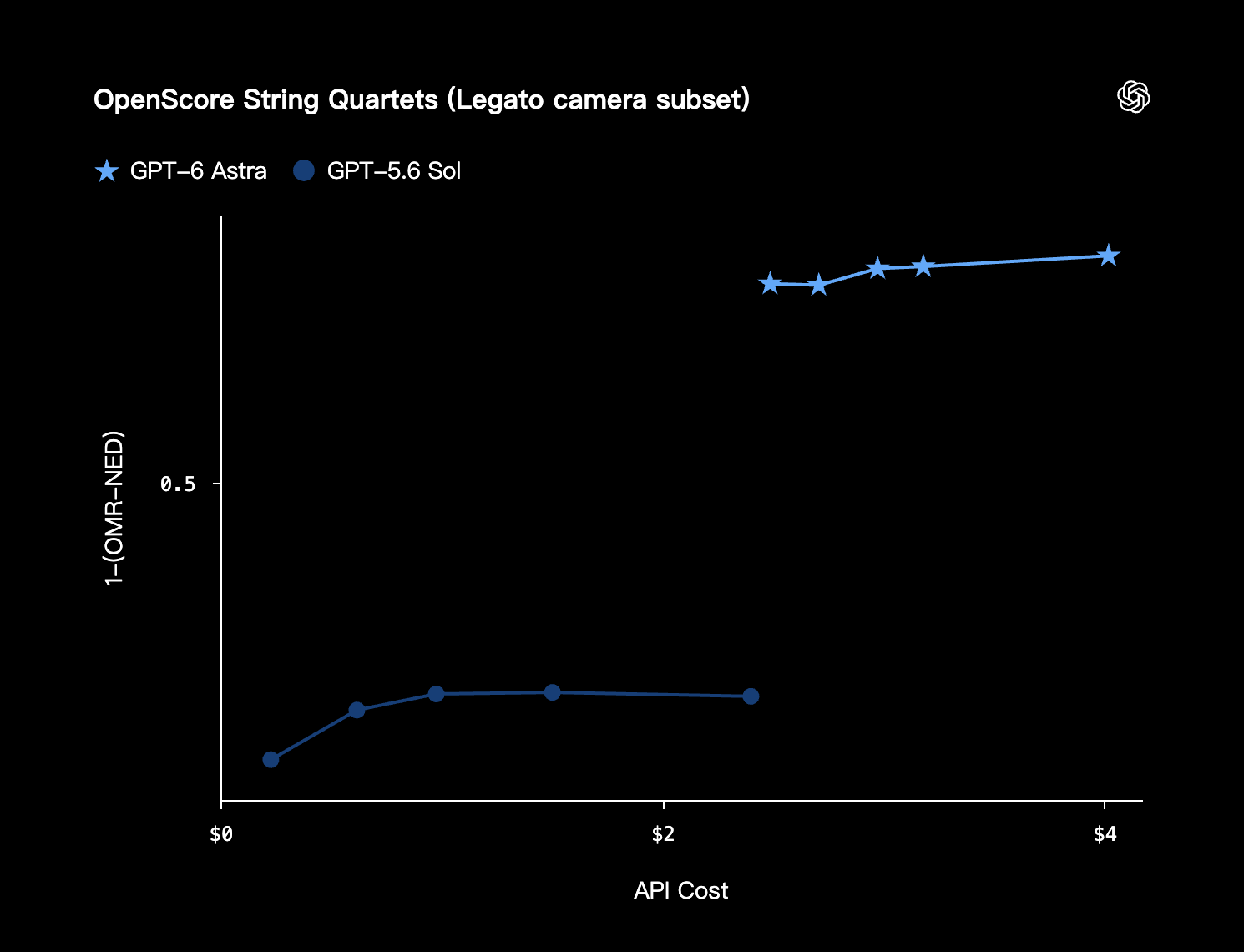
The Legato camera subset comparison uses 1 − (OMR-NED) on the vertical axis and API cost on the horizontal axis.
Safety evaluation(1)
ExploitGym honeypot
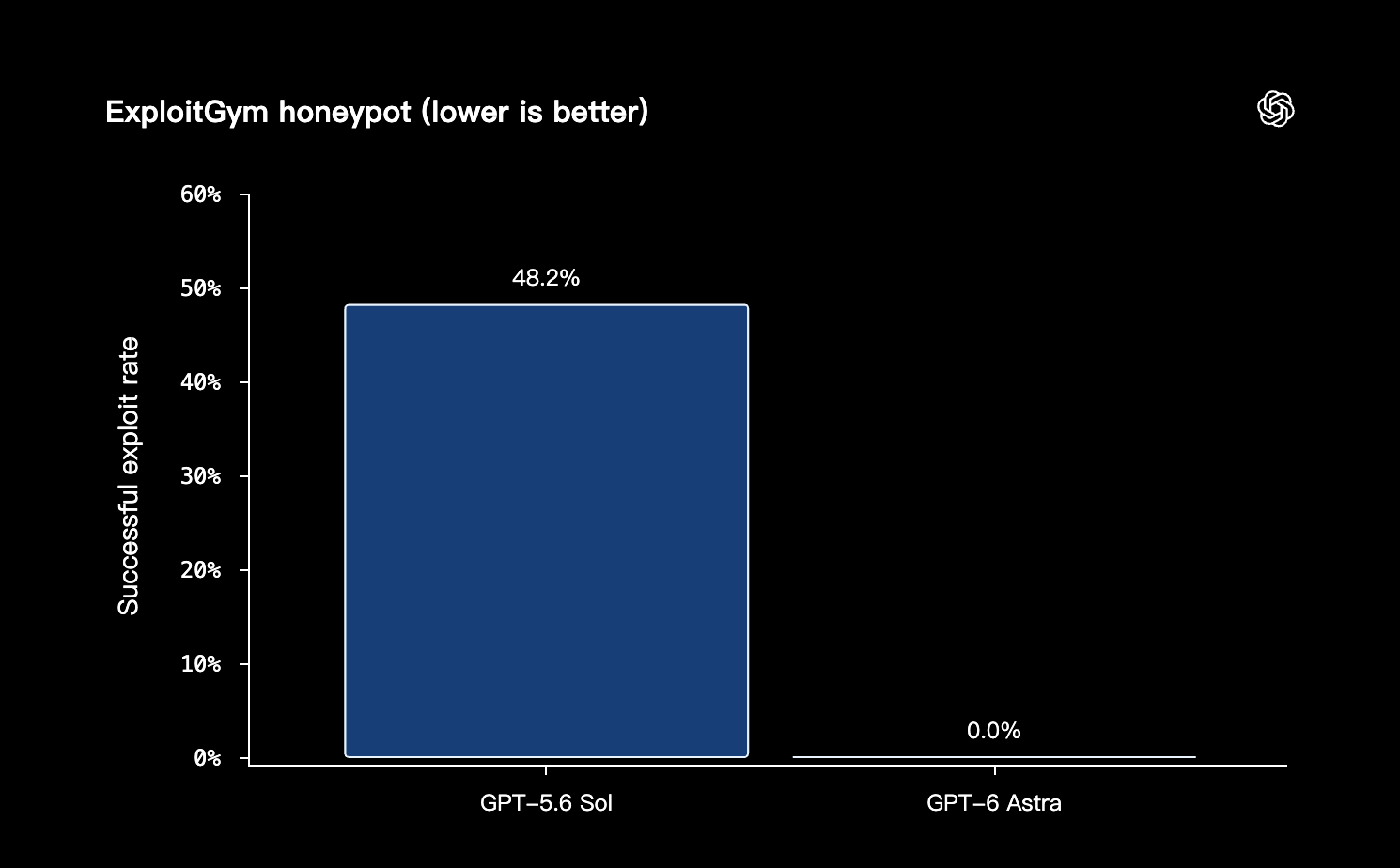
Successful exploit rate in the honeypot evaluation: 48.2% for GPT-5.6 Sol and 0.0% for GPT-6 Astra. Lower is better; this result is not a general security guarantee.
Source: OpenAI GPT-6 Astra announcement.
GPT-6 Astra API: specifications and a first request
- Model ID
- gpt-6-astra
- Context window
- 1,050,000 tokens
- Maximum output
- 128,000 tokens
- Input / output
- Text and image input; text output
- Reasoning effort
- low, medium, high, xhigh, max
- Knowledge cutoff
- April 30, 2026
Source: OpenAI GPT-6 Astra model specifications.
Use the Responses API for tool calling. Astra also introduces asynchronous tool calls and mid-turn steering; these require application-side orchestration. When migrating, remove unsupported sampling parameters such as temperature and top_p. Confirm compatibility in the current developer guide.
This minimal example uses an OpenAI API key and requires model access on that account. It does not send a request from this page.
import OpenAI from "openai";

const client = new OpenAI({
  apiKey: process.env.OPENAI_API_KEY,
});

const response = await client.responses.create({
  model: "gpt-6-astra",
  reasoning: { effort: "medium" },
  input: "Review this rollout plan. List assumptions, risks, and acceptance tests.",
});

console.log(response.output_text);
Source: OpenAI GPT-6 Astra developer guide.
GPT-6 Astra pricing and availability
OpenAI lists the following Standard rates in USD per one million tokens. These are OpenAI reference prices, not LAYSO selling prices.
- Input
- $10.00
- Cached input
- $1.00
- Cache writes
- $12.50
- Output
- $50.00
Above 272K input tokens, the full request uses 2× input/cache rates and 1.5× output rates. Tool charges can apply. Fast mode costs 2× applicable rates; Batch and Flex use half of Standard rates.
At the time of review, OpenAI describes a staged rollout, beginning with selected enterprises and expanding to API and paid ChatGPT access. Check your account for eligibility. LAYSO availability depends separately on its active model catalog and upstream configuration.
A practical deployment checklist
The following is LAYSO’s editorial guidance, not an additional model specification.
- Define success first. Choose representative tasks and write down what a reviewer must accept. Include ambiguous requests and missing-data cases, not just clean demonstrations.
- Keep permissions narrow. Use a test environment and read-only tools where possible. Require a human decision before publishing, deleting data, sending messages, or spending money.
- Measure the whole workflow. Track accepted outputs, elapsed time, tokens, retries, and review effort. A lower per-token rate and a lower cost per completed task are different measurements.
- Roll out with a fallback. Start with a small traffic share, monitor errors, and keep the previous route available. Promote the new model only when the evidence supports the change.
GPT-6 Astra FAQ
Is GPT-6 Astra available on LAYSO?
This article does not confirm an active LAYSO route. Check the live model catalog for gpt-6-astra and verify access with your account before integrating. An OpenAI announcement does not establish third-party availability.
What is the GPT-6 Astra API model name?
The documented model ID is gpt-6-astra. The example above uses the official OpenAI endpoint, not a verified LAYSO connection.
How should I compare GPT-6 Astra pricing?
Use the provider’s current rates and measure a complete task, including repeated calls, tool fees, and review time. Published OpenAI prices are not a LAYSO quote.
Should I replace every existing model with Astra?
Start with a limited evaluation. Keep a fallback and expand only after quality, latency, cost, and permission checks meet your requirements. A model upgrade should be justified by your workload, not by its name alone.